1. The Human Visual System & Perception
Understanding how images form in the eye helps inform how we process digital images.
-
Anatomy & Image Formation: The lens focuses light from objects directly onto the retina.
- Unlike a standard camera that achieves focus by varying the distance between the lens and the image plane, the human eye focuses by using muscles to change the physical shape of the lens.
-
Photoreceptors: The retina is covered with two main types of light receptors:
-
Cones: Roughly 6 to 7 million cones are concentrated in the central portion of the retina and are highly sensitive to color.
-
Rods: Roughly 75 to 150 million rods are distributed across the retina surface and provide vision at low levels of illumination.
-
-
Visual Phenomena: * Simultaneous Contrast: A region's perceived brightness does not depend solely on its actual intensity. For example, identical gray squares will appear progressively darker if their surrounding background becomes lighter.
- Optical Illusions: The eye can fill in non-existing information or wrongly perceive the geometrical properties of objects.
2. Image Acquisition & Digitization
Images are generated by the combination of an illumination source and the reflection of that energy by objects in a scene.
The Image Formation Model
A simple image can be expressed as a two-dimensional function
- Illumination limits:
- Reflectance limits:
(where 0 is total absorption and 1 is total reflectance).
Digitizing the Signal
Because most sensors output a continuous waveform, creating a digital image requires two distinct processes:
- Image Sampling: Digitizing the spatial image coordinates.
- Image Quantization: Digitizing the image amplitude (intensity levels).
3. Representation, Resolution & Contrast
Once sampled and quantized, digital images are represented as a matrix where integer coordinate values map one-to-one with matrix rows and columns.
-
Image Center: The coordinates of the image center are defined as
. -
Dynamic Range: The ratio between the maximum measurable intensity level and the minimum detectable intensity level. The upper limit is dictated by saturation, while the lower limit is dictated by noise.
-
Contrast: The specific difference in intensity between the highest and lowest intensity levels present in an image.
Resolution Types
- Spatial Resolution: A measure of the smallest discernible detail in an image, typically expressed in dots per inch (dpi) or line pairs .
- Intensity Resolution: The smallest discernible change in an intensity level. This is heavily dependent on the number of bits used to store each pixel. More intensity levels allow for finer detail discrimination. (e.g., an 8-bit pixel allows for 256 intensity levels, whereas a 1-bit pixel provides only 2 levels, rendering a binary image) .
4. Pixel Relationships & Distances
Neighborhoods
A pixel
- 4-Neighbors
: Horizontal and vertical neighbors at - Diagonal Neighbors
: . - 8-Neighbors
: The union of and .
Distance Measures
For pixels
- Euclidean Distance:
- City-Block Distance (
): - Chessboard Distance (
):
5. Mathematical & Spatial Operations
Linear vs. Non-Linear Operations
An operator
- Example of a Linear Operator: The Sum operator (
). - Example of a Non-Linear Operator: The Max operator.
Common Operations
-
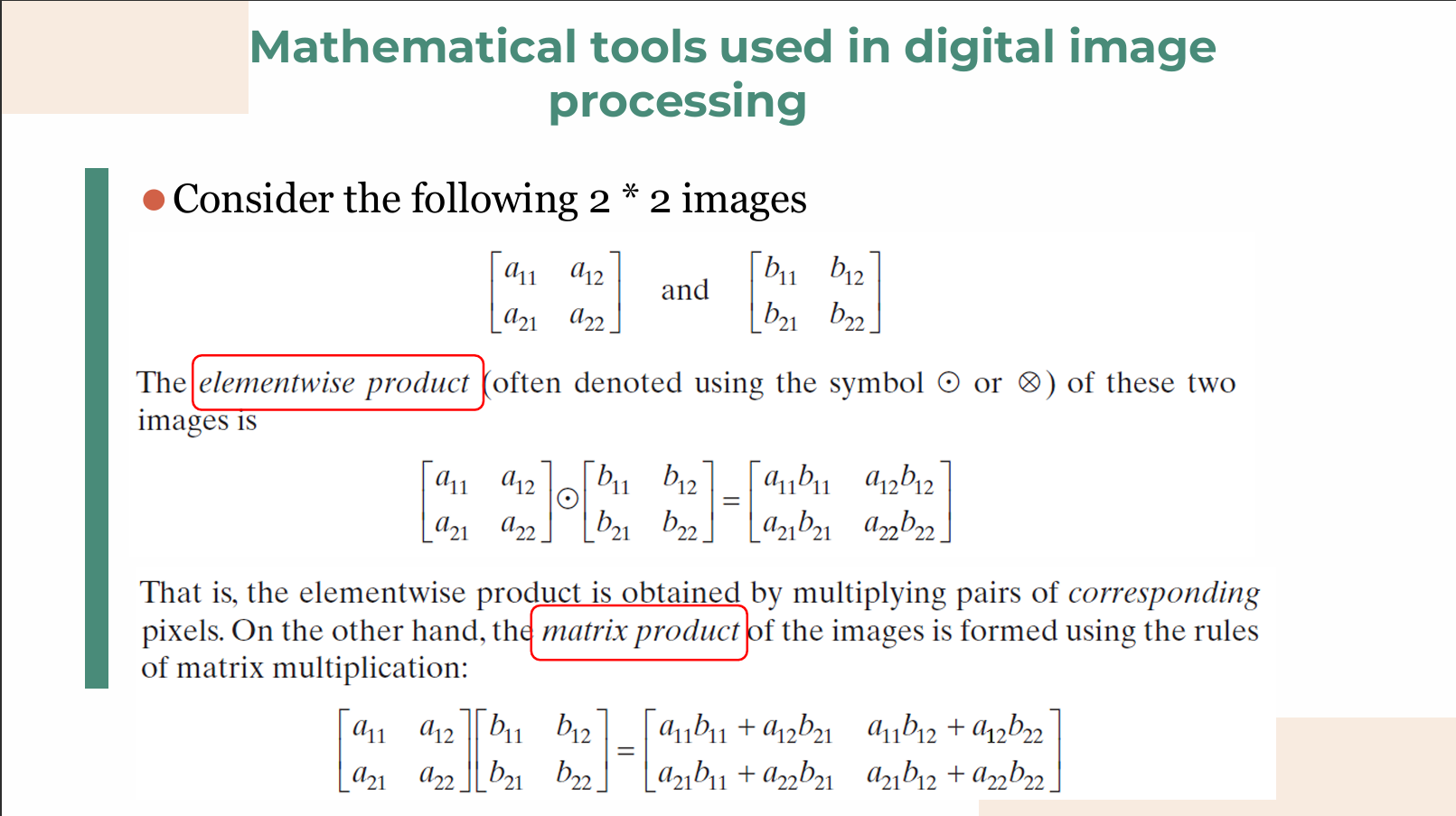
Arithmetic: Addition, subtraction, multiplication, and division require images of the exact same size .
- Application: Image Averaging. A noisy image
can be smoothed by averaging different noisy images . -
- Application: Masking (ROI). Extracting a Region of Interest involves multiplying a given image by a mask that contains 1's in the ROI and 0's elsewhere.
- Application: Image Averaging. A noisy image
-
Logical & Set Operations: Operations like AND, OR, NOT, and XOR , as well as basic set theories like union (
), intersection ( ), and complement .
Spatial Operations
Operations performed directly on the pixels can be classified by their scope:
-
Point: The output value depends only on the input value at that exact coordinate.
-
Local: The output value depends on the input values in the neighborhood surrounding that coordinate.
-
Global: The output value depends on all values within the entire input image.
• A few comments about implementing image arithmetic operations are in order before we leave this section. In practice, most images are displayed using 8 bits (even 24-bit color images consist of three separate 8-bit channels). Thus, we expect image values to be in the range from 0 to 255.
• When images are saved in a standard image format, such as TIFF or JPEG, conversion to this range is automatic.
• When image values exceed the allowed range, clipping or scaling becomes necessary. For example, the values in the difference of two 8-bit images can range from a minimum of -255 to a maximum of 255, and the values of the sum of two such images can range from 0 to 510.
• When converting images to eight bits, many software applications simply set all negative values to 0 and set to 255 all values that exceed this limit.
6. Image Transforms & Probabilities
Transform Domain
When spatial domain processing is insufficient, a 2-D linear transform can be applied. The forward transform is given by:
The image can be returned to the spatial domain via an inverse transform using the inverse transformation kernel
Probabilistic Methods
Treating image intensities as random quantities allows for statistical analysis. The probability of an intensity level
- Mean (average intensity):
- Variance: