This lecture transitions from the spatial and frequency filtering techniques discussed previously to Morphological Image Processing. While standard spatial filters (like the Sobel or Laplacian operators) rely on numerical arithmetic to find edges, morphology relies on set theory to analyze and manipulate the geometric shape of features within an image.
Morphological operations are typically performed on binary images (where pixels are either 0 or 1) to extract boundaries, skeletons, or to clean up imperfections introduced during the segmentation process.
1. Structuring Elements (SE)
In spatial filtering, you use a "kernel" or "mask" containing numerical weights. In morphology, you use a Structuring Element (SE), which is simply a shape mask.
-
Composition: An SE is typically a small grid (e.g.,
or ) containing 1s, 0s, or "don't care" elements. It does not require numerical values, just a defined shape. -
Origin: Every SE has a defined "origin" (usually the center pixel), which acts as the anchor point when moving the SE across an image.
2. The Fundamental Primitives
All morphological algorithms are built upon two primitive operations: Dilation and Erosion.
A. Dilation (
Dilation expands objects, fills in small holes, and connects disjoint shapes.
-
The Math: Mathematically, dilation of image
by SE is the set of all translations such that the reflection of overlaps with by at least one pixel: . -
The Technique: You move the SE over the image, placing its origin at every pixel. If any 1-pixel in the SE coincides with a 1-pixel in the image, the output pixel becomes 1. It acts like a localized binary OR operation.
B. Erosion (
Erosion shrinks objects by etching away their boundaries. It is highly effective at removing small noise, thin branches, or bridges between larger shapes.
-
The Math: Erosion of image
by SE is the set of all translations where the SE is completely contained within : . -
The Technique: You move the SE over the image. The output pixel is 1 only if every single 1-pixel in the SE perfectly coincides with a 1-pixel in the underlying image. If even one pixel misses, the output is 0. It acts like a localized binary AND operation.
3. Compound Operations
By combining erosion and dilation, we can achieve more complex structural filtering without drastically altering the overall size of the original objects.
-
Opening (
): Defined as an erosion followed by a dilation: . - Effect: It generally smooths the contour of an object, breaks narrow isthmuses, and eliminates thin protrusions or small noise. Because the initial erosion destroys tiny objects entirely, the subsequent dilation cannot bring them back, but it restores the main objects back to their original size.
-
Closing (
): Defined as a dilation followed by an erosion: . - Effect: It connects objects that are close to each other, fills gaps in contours, and eliminates small holes. The initial dilation bridges small gaps, and the subsequent erosion shrinks the outer boundaries back down, leaving the newly filled gaps intact.
4. Advanced Applications
Hit-or-Miss Transform (HMT)
The HMT is a strict shape detection tool. Instead of using one SE, it uses two:
-
Equation:
. -
Logic: It finds the exact locations where
matches the foreground perfectly, AND matches the background perfectly at the exact same origin.
The Hit-or-Miss Transform (HMT) is a strict shape detection tool that requires two distinct conditions to be met simultaneously. Using the numerical example from slides 48 and 49, the objective is to locate a specific, isolated cross shape within a
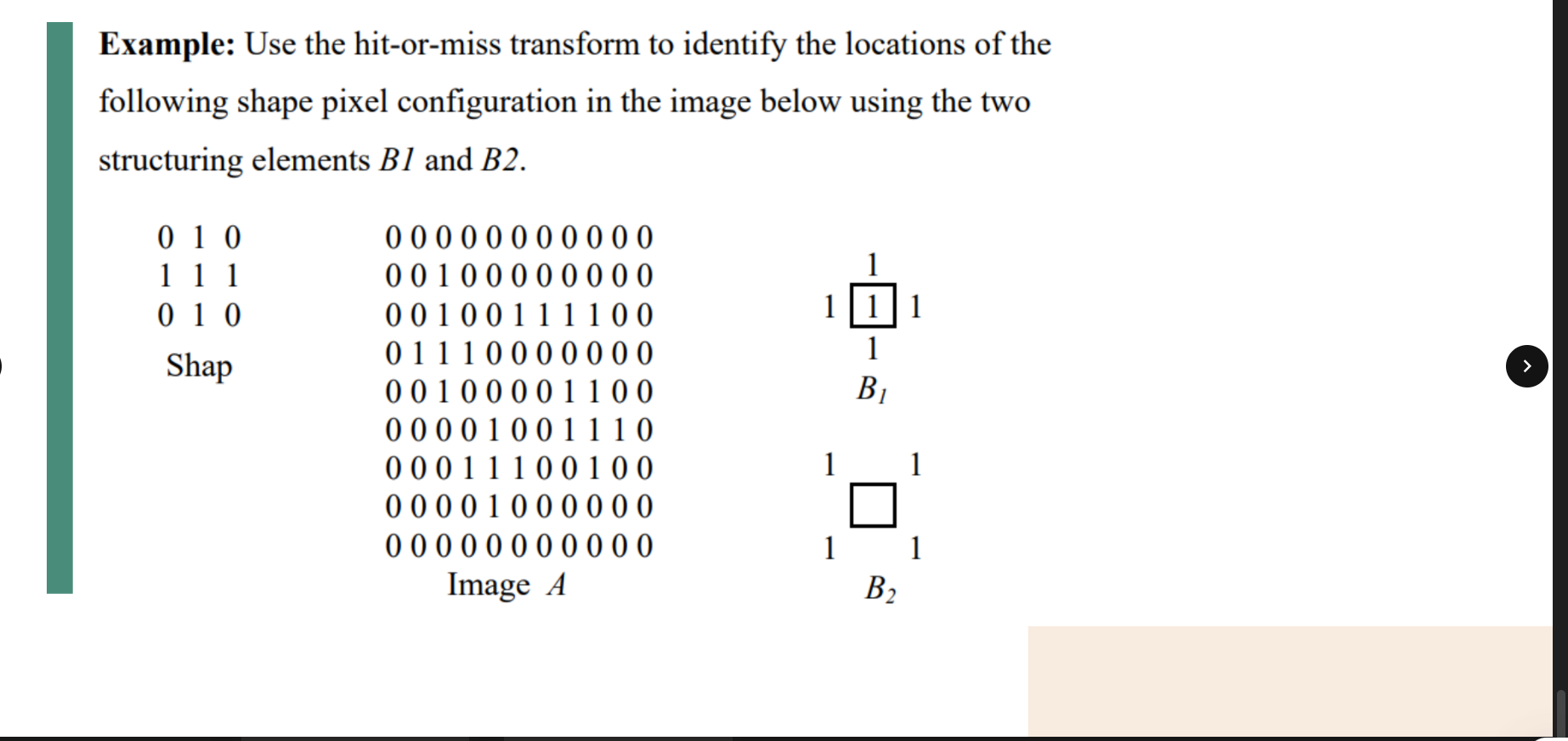
To achieve this precision, the HMT utilizes two paired structuring elements:
-
(The "Hit" Mask): A cross shape. Earning a "hit" requires the foreground of the image to perfectly cover this entire cross. -
(The "Miss" Mask): A mask highlighting the four corners. Earning a "miss" requires the background of the image to perfectly cover these corners, ensuring the cross is completely isolated and not fused to a larger object.
Here is the mathematical breakdown of how the algorithm processes the matrix:
Step 1: Finding the Hits (
First, we erode the original Image A using the
-
Centered at Row 3, Col 2
-
Centered at Row 6, Col 4
-
Centered at Row 5, Col 8
At this stage, the intermediate matrix for Step 1 registers 1s at these three coordinates.
Step 2: Checking the Local Background (
Next, the algorithm must verify if those three identified crosses are isolated. It does this by eroding the complement of the image (0) in the original image.
-
Candidate (3, 2): The four corners at (2,1), (2,3), (4,1), and (4,3) are all
0in the original image. This is a perfect match. -
Candidate (6, 4): The four corners at (5,3), (5,5), (7,3), and (7,5) are all
0. This is also a perfect match. -
Candidate (5, 8): If we check the top-left corner of this specific cross, located at (4,7), we find a
1in the original image. Because there is an extra foreground pixel directly touching the cross, it is not isolated. The background check fails.
Step 3: The Intersection (
The final HMT matrix is the logical AND (intersection) of Step 1 and Step 2. Because the cross at (5,8) failed the background check, it is eliminated. Only the two perfectly isolated crosses at (3, 2) and (6, 4) survive the final cut.
Boundary Extraction
Morphology offers a highly efficient way to outline objects, providing an alternative to derivative-based edge detection (like Sobel).
-
Inner Boundary: Erode the image to strip away the outer layer of pixels, then subtract that eroded image from the original:
. -
Outer Boundary: Dilate the image to add a layer of pixels to the outside, then subtract the original image from the dilated result:
.