While the first half focused on finding local discontinuities (points, lines, and edges), this half shifts to piecing those local features into global shapes and grouping pixels based on similarity.
1. Global Processing: The Hough Transform
Local edge linking (like the neighborhood magnitude/angle checks we did previously) can sometimes struggle to connect fragmented edges into meaningful shapes. If the goal is to detect straight, continuous structures—like tracking lane boundaries for highway traffic analysis—we need a global perspective. The Hough Transform is a technique used to find edge points that lie along a specific mathematical shape, most commonly straight lines.
The Mathematical Concept
Instead of looking at the image in the standard Cartesian
Initially, you might think to use the standard line equation
-
is the perpendicular distance from the origin to the line. -
is the angle of that perpendicular line (ranging from to ).
The Accumulator Algorithm
-
Initialize: Create a 2D matrix (an accumulator array) where the rows represent quantized values of
and columns represent quantized values of . Set all cells to zero. -
Transform: For every edge pixel
found in your image, loop through every possible angle and calculate the resulting using the polar equation. -
Vote: Round
to the nearest index and increment that cell in the accumulator by 1. -
Extract: A single point in the
-plane becomes a sinusoidal curve in the -plane. When multiple curves intersect at the exact same cell, it creates a "peak" in the accumulator. This peak represents a strong line in the original image.
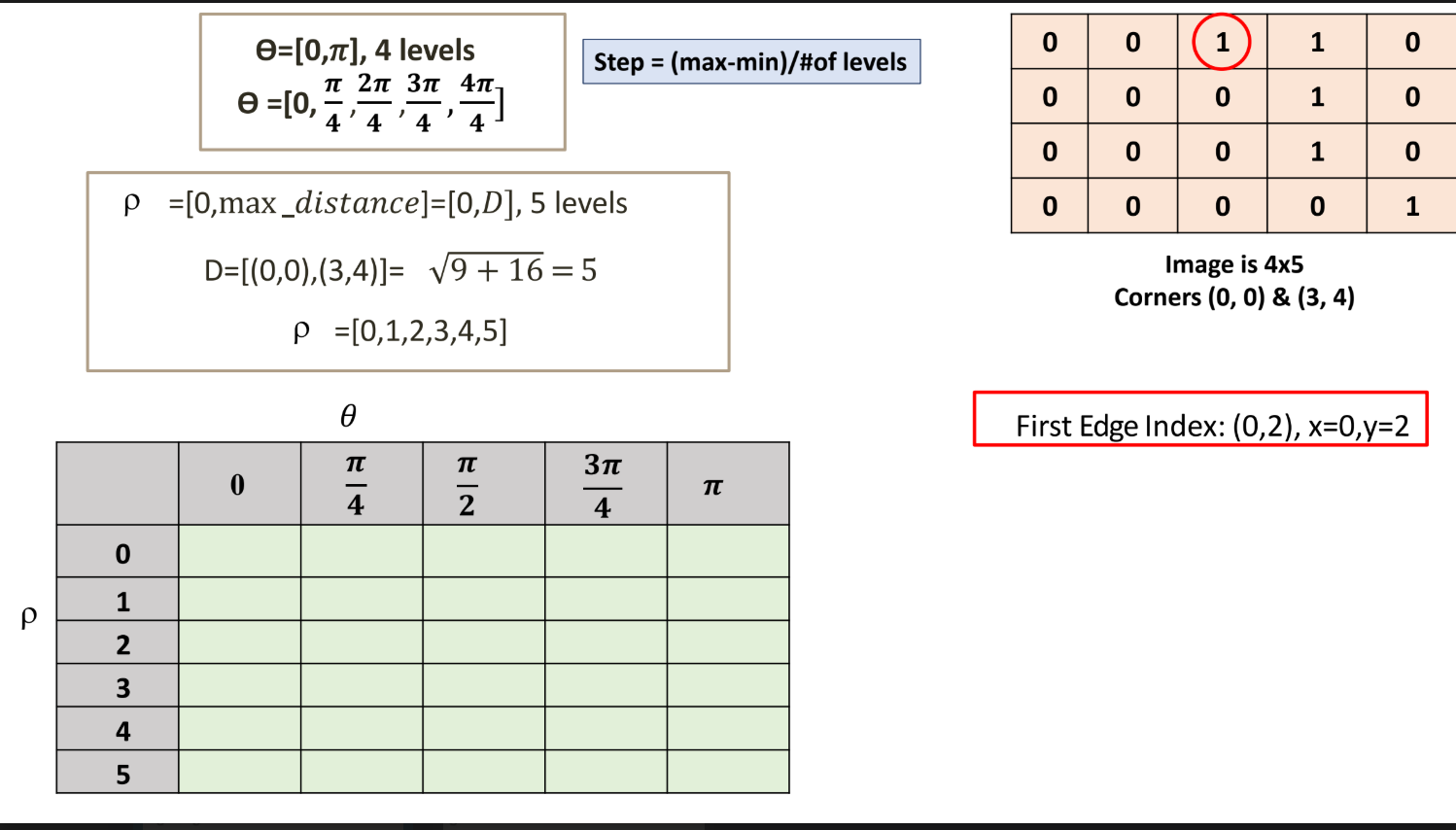
The goal of this example is to take a binary image containing edge pixels and map them into the Hough parameter space (
1. Setting Up the Image and Coordinate System
The example begins with a 1s represent detected edge pixels.
-
Coordinate System: The corners of the image are defined as
at the top-left and at the bottom-right. This indicates that represents the row index and represents the column index. -
Maximum Distance (
): The maximum possible perpendicular distance from the origin to any line in this image is the diagonal distance, calculated as . -
Edge Points: Based on the provided matrix, the edge points
are located at: -
2. Parameter Space Quantization
To create the 2D accumulator array, the continuous parameters
-
Angle (
): The slides specify ranges from to using levels: . -
Distance (
): Ranges from to the maximum distance with levels: .
This creates a
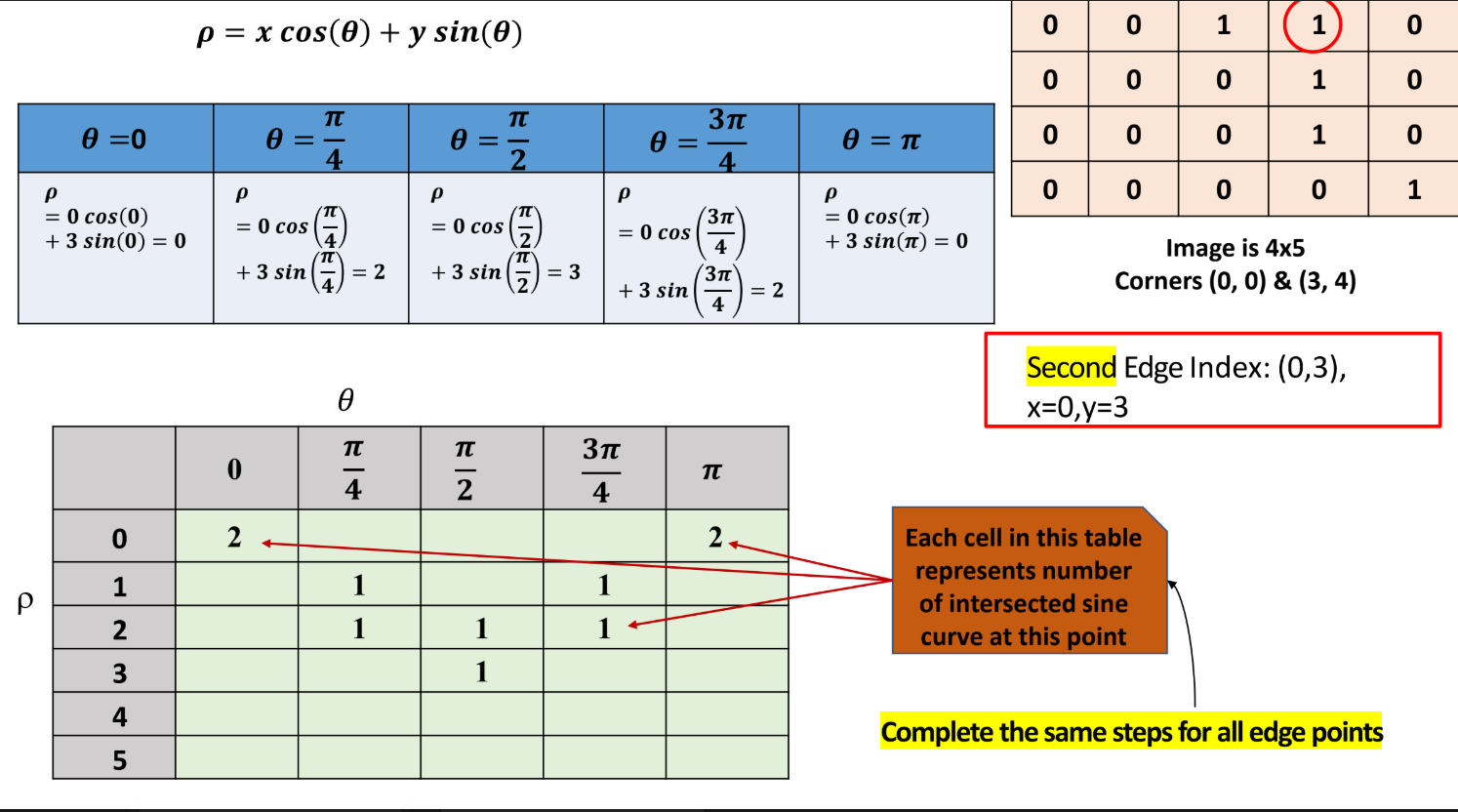
3. The Accumulation Process (The Math)
For every edge pixel
Processing the First Edge Point:
-
: . (Increment cell ) -
: . (Increment cell ) -
: . (Increment cell ) -
: . (Increment cell ) -
: . (Increment cell )
Processing the Second Edge Point:
-
: . -
: . -
: . -
: . -
: .
Note: As this process repeats for the remaining pixels
4. Thresholding to Find Lines
Once the accumulator is fully populated, a threshold is applied to find the strongest lines. The slides specify a threshold of 3. Any value in the final matrix where the intersection count is 1 (indicating a valid line), and everything else is set to 0.
(Note: The slides explicitly state that the final
Note: This same principle can be adapted for circle detection by expanding the parameter space to 3D to account for the circle equation
2. Region-Based Segmentation (Similarity)
When edges are too noisy or disconnected, finding boundaries fails. Region-based segmentation takes the opposite approach: it groups pixels together that share similar attributes (like intensity, color, or texture).
Simple Global Thresholding
This is the most basic form of segmentation. If you have light objects on a dark background, you separate them by choosing a threshold
-
If
, it becomes the object (e.g., 1 or white). -
If
, it becomes the background (e.g., 0 or black). -
Multilevel Thresholding uses multiple thresholds (
) to separate multiple distinct objects from the background.
Automatic Threshold Calculation: Instead of guessing
-
Compute the average gray level (
) for pixels in the background and the average gray level ( ) for pixels in the object. -
Set the threshold exactly in the middle:
. -
Apply this threshold to create the binary image.
Region Growing
When simple thresholding fails (e.g., due to uneven lighting or severe noise), Region Growing is used.
-
Seed Selection: The algorithm starts with a set of specific starting pixels called "seed" points.
-
Aggregation: It looks at the neighboring pixels around the seed. If the absolute difference between the neighbor's gray level and the seed's gray level falls within a strict similarity threshold, that neighbor is "appended" to the growing region.
-
Iteration: This process spreads outward like a puddle until no more adjacent pixels meet the similarity criteria.